

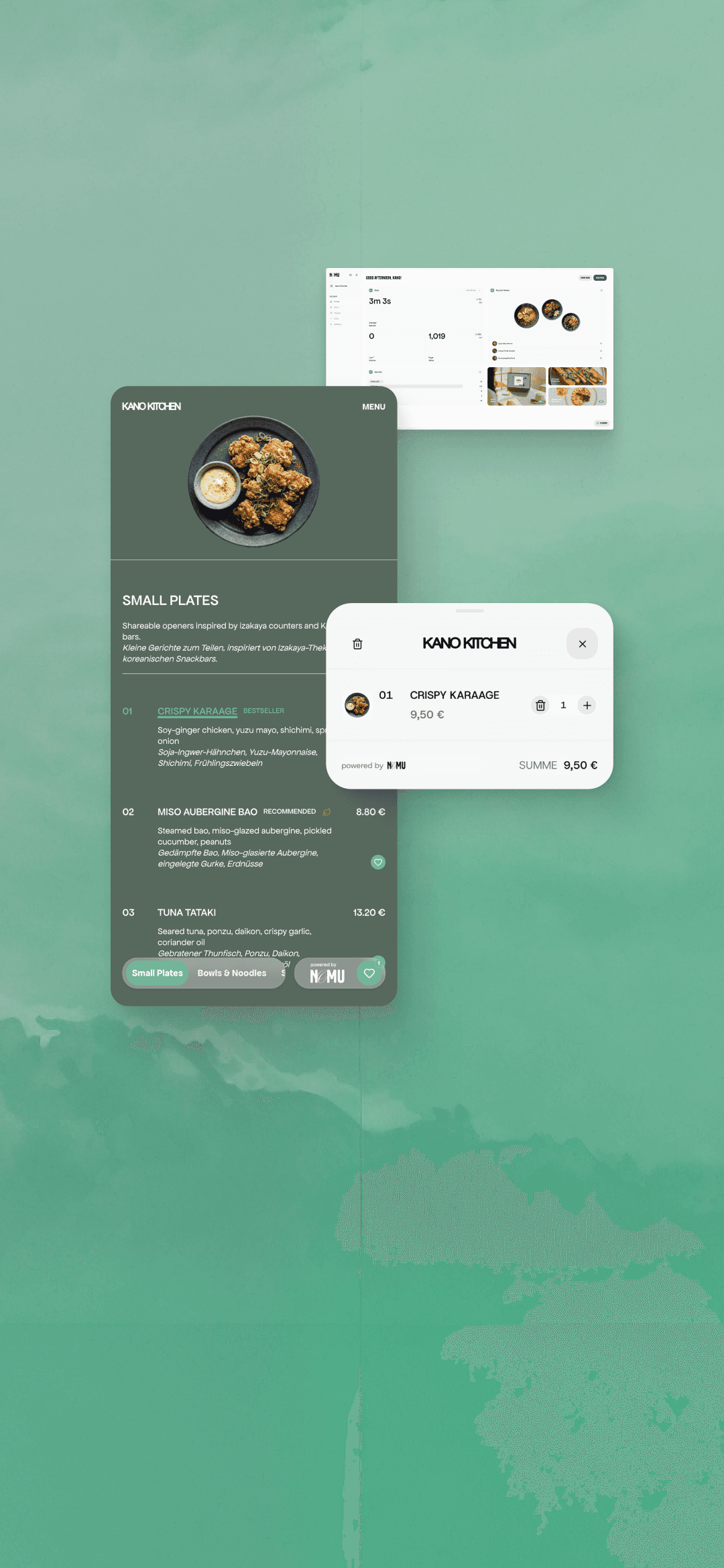
NOMU turns restaurant menus into a visual experience for guests – and a self-service product for restaurants.
PRODUCT STRATEGY
BRANDING
UX/UI
FRONT-END
BACK-END
CONTEXT
NOMU began as a custom interactive menu for a Japanese restaurant, helping guests understand dishes they could not easily picture from names and descriptions alone.
THE CHALLENGE
Turn one bespoke experience into a product that other restaurants could manage and publish independently.
THE OUTCOME
A live product connecting a visual guest menu with an operator workspace for managing content, imagery, branding and publishing – now maintained independently by active restaurants.
(STATUS)
LIVE PRODUCT
(YEAR)
2025 — ONGOING
(ROLE)
PRODUCT DESIGNER
(BUILD MODEL)
SOLO, AI-ASSISTED DEVELOPMENT
01 | THE OPPORTUNITY

INITIAL GUEST EXPERIENCE

MANUAL SETUP
FRAMER-BASED MENU CODE COMPONENT
02 | DESIGNING NOMU
MVP BOUNDARY
Ordering and payment remain outside the MVP. I wanted to validate the menu experience before taking responsibility for transaction-critical restaurant operations.

OPERATOR WORKSPACE
Restaurants manage dishes, prices, imagery and publishing in one place – turning the original custom menu into a product they can run themselves.

BRAND FLEXIBILITY — THEME CUSTOMIZATION
The menu is often the first touchpoint after guests sit down. Operators can adapt the menu to their brand while NOMU preserves the underlying layout and interaction model.

AI-ASSISTED SETUP
Scan Menu and Image Enhancer reduce setup work, while operators review the result before it reaches the live menu.

GUEST FLOW — THE DINING EXPERIENCE
Selecting a dish changes the visual focus while the rest of the menu stays in view. Guests can compare options, then save their selection in a lightweight Ready-to-Order list for service staff.
03 | WHAT REAL USE REVEALED
01
Make large menus easier to review.
Editing a dish in a modal worked. Reviewing a whole imported menu did not. The interaction model needed to preserve context across the full menu.
02
Reduce manual setup without losing control.
Manual entry made large menus impractical. I limited Scan Menu to content that could be extracted and reviewed reliably, while more variable data remained manual.
03
Make visual content easier to produce.
Not every restaurant had usable imagery for every dish. Requiring professional photography would add cost, coordination and another dependency before a visual menu could go live.

01 – PERSISTENT REVIEW WORKSPACE
Keeping the menu list and editor visible together lets operators review imported dishes without losing their place.

02 – REVIEW-BASED SCAN FLOW
Scan Menu turns an existing menu into an editable draft, keeping operators in control before content enters the live menu.

03 – AI-ASSISTED IMAGERY
Image Enhancer lets operators turn a quick phone photo into a presentation-ready asset, with the final image reviewed before it is added to the menu.
04 | REFLECTION & TAKEAWAYS
FROM PROTOTYPE
TO PRODUCT
Building NOMU end to end changed how I evaluate interaction design. A working product reveals rhythm, feedback and friction differently from a predefined prototype – allowing me to experience decisions in context and refine them much earlier.
PRODUCT JUDGMENT
Owning both design and implementation made prioritization more concrete. A feature's value had to justify its build effort, maintenance and operational responsibility. AI-assisted development became a fast sparring partner for turning ideas into working flows and comparing alternatives – not a replacement for evidence from real users.
THE NEXT QUESTION
NOMU proved that I could take a product from an initial opportunity to a live experience used independently by restaurants. What I did not validate was a repeatable path to market. If I continued the product, I would address distribution alongside improvements to guest discovery and multilingual support.